
Exclusive promotions and prices
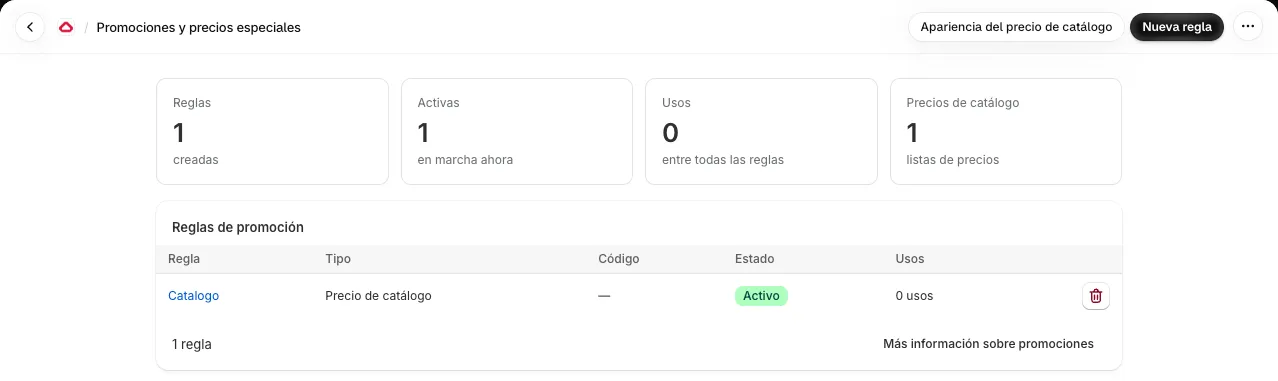
The Promotions section of the app lets you create discounts and prices that only app users see and pay. They run inside Shopify’s own checkout through Shopify Functions. The screen lets you create, edit and delete promotions, with a confirmation before deleting, and it can also be opened from Shopify’s discounts section.
Promotion types
Section titled “Promotion types”| Type | Available |
|---|---|
| Coupon | Yes |
| Automatic discount | Yes |
| Special price | Yes |
| Free shipping | Yes |
| Catalog price | Yes, shown in the store |
Discounts can be limited to a product collection and to a minimum order amount.
Catalog prices
Section titled “Catalog prices”Each product variant can have a price only for app users. Unlike a checkout discount, this price is shown on the product page, in collections and in search, and it is applied in the cart. It can be restricted to customers with a specific tag.
A catalog price rule is defined as a percentage discount or as a fixed price, and applies to specific products or to a whole collection.
For themes with block support, a theme block ready to turn on is included. For custom themes there is an equivalent code snippet, in its own section of Settings. The appearance of the catalog price is adjusted from the Catalog price appearance button on the promotions screen.
Import and export prices as CSV
Section titled “Import and export prices as CSV”For large catalogs or catalogs that change often, the editor of a Catalog price rule lets you export and import prices as a CSV file, with the Export CSV and Import CSV buttons.
| Action | How it works |
|---|---|
| Export CSV | You choose a collection and download its current prices and its catalog prices |
| Import CSV | You upload a file with the SKU and PrecioApp columns, the same format the export produces, and a catalog price rule is created or updated |
When importing you can name the rule. The file separator can be a comma or a semicolon and is detected automatically, so CSV files saved from Excel with a European regional setting work. When it finishes, the app reports how many prices were applied, how many rows were skipped and how many errors there were.
If the price has to be updated from your own system, such as an ERP, see exclusive prices through the API.