
Journey of a push notification
A push notification goes through three stages: Reskyt, the operating system’s notification provider (Google or Apple), and the device. This page describes each stage and who is responsible for it.
The journey
Section titled “The journey”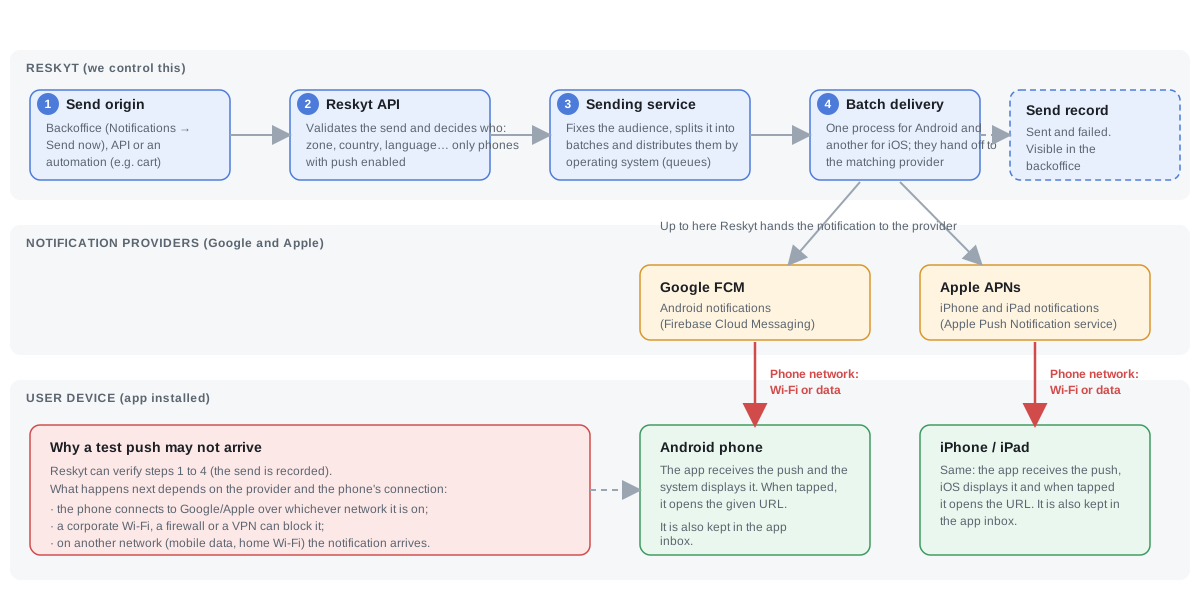
- The send is created. The origin can be the backoffice, the push API or an automation. Reskyt resolves which devices it goes to based on the audience (for example zone, country or language) and, by default, only to those with notifications enabled.
- Delivery is prepared. A sending service fixes the audience, splits it into batches and distributes them by operating system using queues.
- It is handed to the provider. Reskyt hands each notification to Firebase Cloud Messaging (FCM) on Android or to the Apple Push Notification service (APNs) on iOS. Reskyt does not communicate directly with the phone.
- The provider delivers it to the phone. The device receives it over its own connection to Google or Apple. The app displays it and, when tapped, opens the indicated URL. The notification is also kept in the app’s inbox.
Each send is recorded with the number of notifications sent and failed, and can be consulted from the backoffice.
Who controls each stage
Section titled “Who controls each stage”| Stage | Responsible | What it includes |
|---|---|---|
| Origin, API, sending service and hand-off to the provider | Reskyt | Audience resolution, batches, queues and send record |
| Delivery to the device | Google and Apple | FCM on Android, APNs on iOS |
| Device connection | Device and the user’s network | Wi-Fi or mobile data, firewall, VPN |
If the phone has no connection at the time of the send, later delivery depends on the provider’s retention policy and on the notification’s expiry. See push troubleshooting.
Corporate networks
Section titled “Corporate networks”The phone connects to Google or Apple over whichever network it is on. A corporate Wi-Fi, a firewall or a VPN can block that connection, so the same notification may arrive over mobile data or a home Wi-Fi and not over the corporate network. This is the first thing to rule out when testing notifications in a company environment.
According to each provider’s documentation, these are the outbound ports the device needs:
| Platform | Provider | Ports |
|---|---|---|
| Android | Google FCM | 5228, 5229 and 5230 |
| iOS | Apple APNs | 5223, with 443 as an alternative if the device cannot reach APNs on 5223 |
References: FCM, troubleshooting and Apple, enterprise networks. These values are defined by each provider and may change.
For a test notification to reach a phone connected to a corporate network, the customer’s network team must allow those connections. How to send a test: test push notifications.