
Push notifications with Shopify Flow
Reskyt adds two actions to Shopify Flow to send push notifications to app users with nothing to code: a trigger, an action and the message text. They are built from Flow in the Shopify admin.
Before you start
Section titled “Before you start”The actions send through the Reskyt push API, so the store needs a key for that API.
- In the Reskyt backoffice, in the app’s developer settings, create a push API key.
- In the Reskyt app in Shopify, go to Settings, section Push notifications, paste the key into the Push API key field and click Save key.
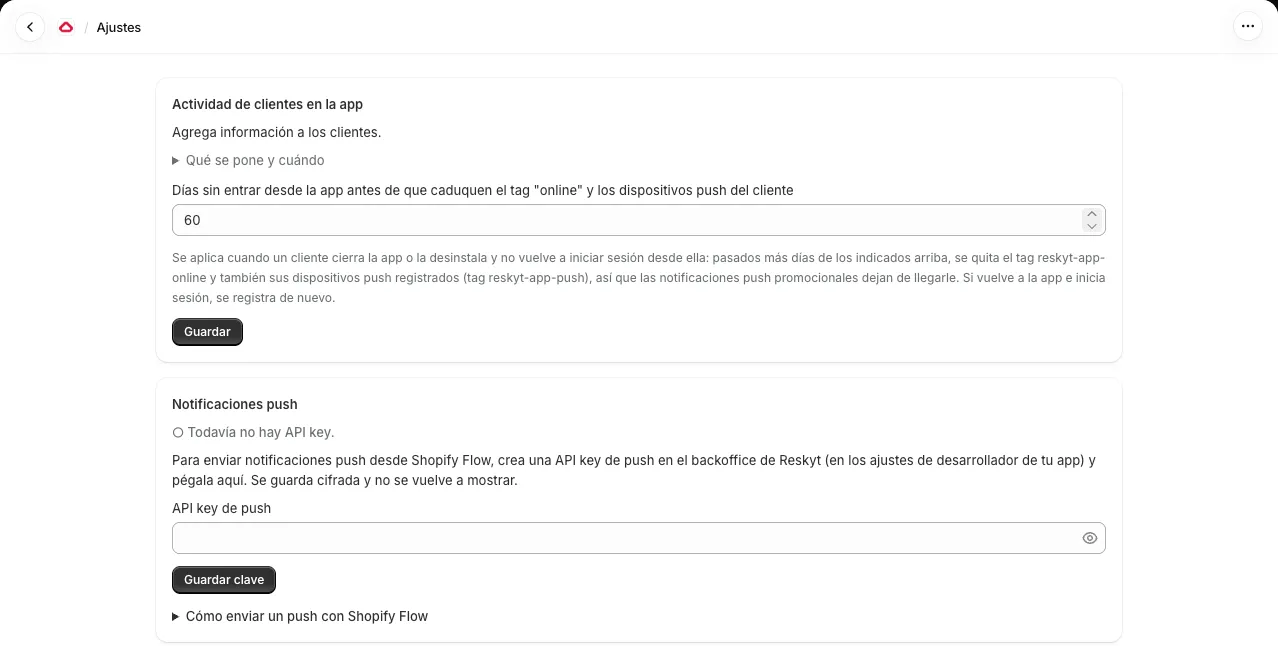
The key is stored encrypted and is not shown again. If a workflow tries to send without a key, the Notifications section of the app shows a notice to add it in Settings.
The two actions
Section titled “The two actions”| Action | Who it sends to | What it is for |
|---|---|---|
| Send Reskyt order push | The device the order was placed from | Order status updates |
| Send Reskyt marketing push | The customer’s registered devices | Promotions and campaigns |
The devices for a marketing notification are, in this order, those from their
orders placed in the app and the one registered at login. It only reaches
customers with a registered device, which have the reskyt-app-push tag, until
the days set in Settings pass without them entering from the app.
Order notifications only reach orders placed from the app. If the customer bought on the website there is no device, nothing is sent and Flow records it as “without app”.
Action fields
Section titled “Action fields”| Field | Required | Description |
|---|---|---|
Order (Order) or customer (Customer) | Yes | Depends on the action. Flow fills it in; on shipping triggers you choose the order the shipment belongs to |
Message | Yes | The notification text. It accepts Flow variables |
Heading | No | Short headline above the message |
Link | No | Page opened by the notification: a web URL, a deep link or home. Empty, it opens the store’s home page |
Image | No | Preview image, an https URL, for example a file from Shopify Content → Files. Without an image the app icon is shown |
Expires in (hours) | No | Validity time. Empty or 0 means 7 days |
Variables are written with double braces, for example {{order.name}} for the
order number.
Build a recipe
Section titled “Build a recipe”- In Shopify, open Flow and click Create workflow.
- Pick the trigger (next table).
- Only for “on its way”, “out for delivery” and “delivered”, add a condition on the status of the shipping event.
- Add the Send Reskyt order push action and fill in the fields. To open
order tracking, put
{{order.statusPageUrl}}inLink.
Which trigger for each status
Section titled “Which trigger for each status”| Status | Flow trigger | Condition |
|---|---|---|
| Order received | Order created | None |
| Being prepared | Order paid | None |
| Shipped | Fulfillment created | None |
| On its way | Fulfillment event created | The event status is IN_TRANSIT |
| Out for delivery (optional) | Fulfillment event created | The event status is OUT_FOR_DELIVERY |
| Delivered | Fulfillment event created | The event status is DELIVERED |
A few notes:
- Shopify has no “being prepared” event. The usual choice is Order paid: the order is confirmed and goes into preparation. If the store handles it differently, for example with a tag the team adds, pick the Flow trigger that matches that change.
- “On its way”, “out for delivery” and “delivered” only arrive if the carrier reports the status. Without a carrier with built-in tracking, Shopify does not create those events and those recipes do not run. “Received”, “being prepared” and “shipped” always work.
- Other shipping statuses that can be used as a condition are
READY_FOR_PICKUP,ATTEMPTED_DELIVERY(delivery attempt failed),DELAYEDandFAILURE(problem with the shipment).
Suggested texts
Section titled “Suggested texts”Copy them into the Message field. All of them use {{order.name}} for the
order number.
| Status | Spanish | English |
|---|---|---|
| Order received | ¡Gracias por tu compra! Hemos recibido tu pedido {{order.name}}. | Thanks for your order! We’ve received order {{order.name}}. |
| Being prepared | Estamos preparando tu pedido {{order.name}}. Te avisaremos cuando salga. | We’re preparing order {{order.name}}. We’ll let you know when it ships. |
| Shipped | ¡Tu pedido {{order.name}} ya ha salido! Puedes seguirlo desde aquí. | Order {{order.name}} has shipped! You can track it here. |
| On its way or out for delivery | Tu pedido {{order.name}} está en camino. | Order {{order.name}} is on its way. |
| Delivered | ¡Tu pedido {{order.name}} ha sido entregado! Esperamos que lo disfrutes. | Order {{order.name}} has been delivered! We hope you enjoy it. |
Customers in several languages
Section titled “Customers in several languages”The app does not know which language each customer speaks: you decide it inside
Flow. Every order stores the customer’s language and Flow offers it as
order.customerLocale, for example es, en or fr.
The cleanest way is to add a condition before the action:
- After the trigger, add the condition If
order.customerLocalecontainses. - In the “Yes” branch, put the action with the Spanish text.
- In the “No” branch, add another condition for
en,frand the other languages, or simply put the text in the store’s language as a fallback.
With a single language none of this is needed.
Using the customer’s name
Section titled “Using the customer’s name”The order recipes do not use the customer’s name on purpose: personal data is not read, so there is no need to ask Shopify for extra permissions. For messages with their name, use the Send Reskyt marketing push action, which accepts customer variables, such as their first name, written in Flow.
Check that it works
Section titled “Check that it works”- Turn the workflow on and place a test order from the app.
- Trigger the matching event, for example mark the order as prepared and shipped.
- In the Reskyt app open Notifications: the Automatic notifications (Shopify Flow) section shows each notification with its status and the devices reached.
“Sent” means Reskyt accepted the notification, not that the customer opened it. Opens are counted when the notification carries a link to a page of the store.
Limitations
Section titled “Limitations”- Only customers who placed the order from the app are notified.
- The tracking link (
order.statusPageUrl) can be long and, according to Shopify, order status links have a limited number of uses and expire after a few weeks, so it is meant to be opened soon. - The message text is not stored in the app, because it may contain customer data.
To send a one-off or scheduled notification without Flow, see Notifications from Shopify.