
Colours and typography
The theme brings together the brand’s colours, fonts and shapes. It is configured in Design, Theme. All Reskyt sections and presets use these values, so changing one changes every section at once.
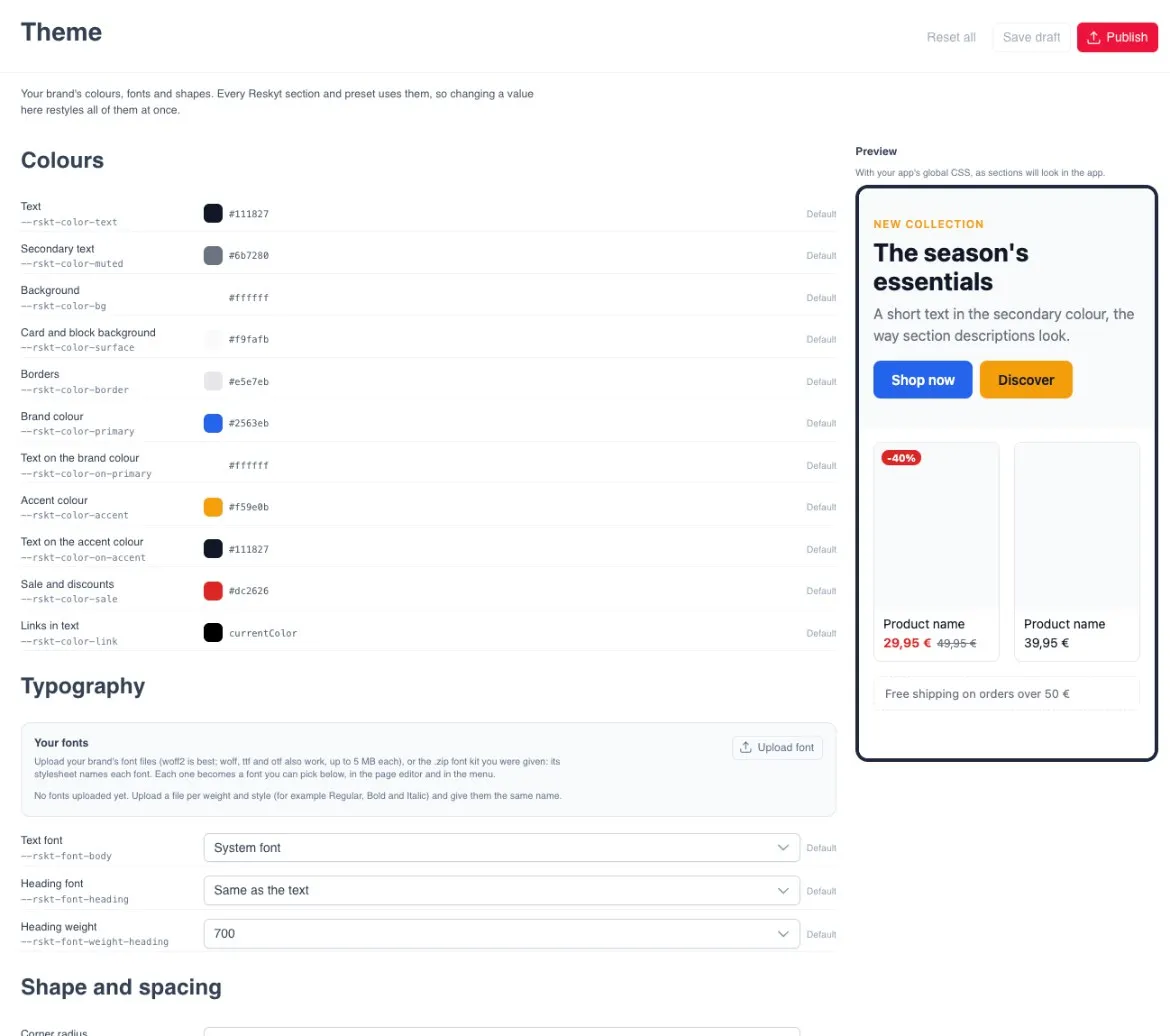
The screen has the Reset all, Save draft and Publish buttons, and on the right a Preview with the result.
Colours
Section titled “Colours”Each colour shows Default until it has been changed.
| Colour | What it is for |
|---|---|
| Text | The main text. |
| Secondary text | Supporting text, such as descriptions. |
| Background | The background of the pages. |
| Card and block background | The background of cards and blocks within the page. |
| Borders | Borders and separators. |
| Brand colour | The brand’s main colour, for example that of the buttons. |
| Text on the brand colour | The text that sits on top of the brand colour. |
| Accent colour | A second colour to highlight elements. |
| Text on the accent colour | The text that sits on top of the accent colour. |
| Sale and discounts | Sale prices and discounts. |
| Links in text | Links within a text. |
Typography
Section titled “Typography”In Your fonts, the Upload font button adds the brand’s fonts:
- Formats: woff2 (recommended), woff, ttf or otf, up to 5 MB per file.
- A font kit in .zip can also be uploaded. Its stylesheet gives each font its name.
- One file is uploaded per weight and style, for example Regular, Bold and Italic, all with the same name.
Uploaded fonts can be chosen in the theme, in the page editor and in the menu. In the theme you choose the Text font, the Heading font and the Heading weight.
Shape and spacing
Section titled “Shape and spacing”| Setting | What it controls |
|---|---|
| Corner radius | How rounded the corners are. |
| button corners | The rounding of the buttons. With 999px, the button is pill-shaped. |
| base spacing | The reference spacing between elements. |
Save draft or publish
Section titled “Save draft or publish”Save draft saves the changes without touching the app. Publish takes them to the app. The screen shows whether the saved theme is already in the app, and the page editor shows a notice when the theme has an unpublished draft. The general process is in Preview and publish.