Audience types
The audience decides who receives a notification. It is chosen in the Audience step when you send or schedule a notification, in the Send to field.
Three rules apply to every type:
- Devices are counted, not people. A person with a phone and a tablet is two devices.
- Only devices with push enabled count. The only exception is the Allow users without token option of the Everyone type.
- Each send uses a single type. They cannot be combined, for example a country and an operating system in the same send.
Available types
Section titled “Available types”| Type | Who receives it |
|---|---|
| Everyone | Every device with push enabled. |
| Zone | Devices in the chosen zones. |
| Country | Devices in the chosen countries. |
| Language | Devices with the chosen languages. |
| Operating system | Android devices or iOS devices. |
| Date | Devices by when they first or last opened the app. |
| Location | Devices within a radius around a point on the map. |
| Device | A specific list of devices. |
| Token | A specific list of push tokens, for V1 integrations. |
| Test | Only the test devices. |
Everyone
Section titled “Everyone”Reaches every device with push notifications enabled.
| Setting | What it does |
|---|---|
| Allow users without token | If enabled, the notification will also appear for users who have not accepted push notifications. |
Reaches the devices in the chosen zones. Several can be chosen. The zones are the ones configured in the app.
Country
Section titled “Country”Reaches the devices in the chosen countries. Several can be chosen. If a country is in more than one zone, it can be limited to some of them.
Language
Section titled “Language”Reaches the devices with the chosen languages. Several can be chosen. The languages are those of the app’s zones and, as with countries, they can be limited to some zones.
Operating system
Section titled “Operating system”Reaches Android devices or iOS devices. One of the two is chosen.
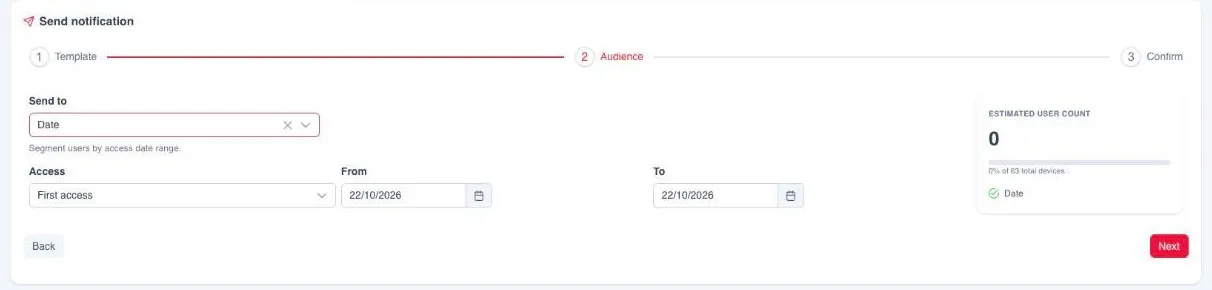
Reaches devices by when they opened the app.
| Setting | What it does |
|---|---|
| Access | First access, the first time the app was opened on the device, or Last access, the most recent one. |
| From and To | The date range, both days included. At most 3 months apart. |
For example, Last access with a range from two or three months ago reaches users who have not opened the app for a while. To do it continuously, see the Re-engage recipe in automations.
Location
Section titled “Location”Reaches the devices located within a radius around a point.
| Setting | What it does |
|---|---|
| Point on the map | The centre of the area. It is chosen by clicking on the map, which shows where the devices are. |
| Radius | Distance from the centre, between 1 and 1,000 km. 20 km by default. |
| Access, From and To | Optional. They also limit by first or last access date, as in the Date type. |
Device
Section titled “Device”Reaches a specific list of devices, identified by their installation id. It is
the same identifier the API uses in deviceId, and it is obtained in the app
with window.ReskytLayout.device.getId(). See the
push API reference.
It is the way to target with data from your CRM: if you store the device identifier together with the customer ID, you build the segment with your data and upload the resulting list.
The list is typed by hand or imported with Import from a CSV file:
- One identifier per line, with no header row.
- Up to 1 MB.
- Importing replaces the existing list. Values can then be added, edited or removed by hand.
Reaches a specific list of push tokens in MD5 format. The list is typed or imported the same way as in Device.
Reaches only the devices registered as test devices. It has no settings. See send test push notifications.
Environment
Section titled “Environment”In apps with more than one environment, the Confirm step lets you choose which environment receives the send, and the audience is limited to that environment’s devices. It does not apply to Device, Token or Test, which already indicate the exact devices.