

Send push notifications
There are two ways to send push notifications: from the backoffice, for one-off campaigns, and from the API, for automated sends from your own systems.
From the backoffice
Section titled “From the backoffice”For one-off campaigns, notifications are created from the Reskyt backoffice with a three-step wizard: Template, Audience and Confirm.
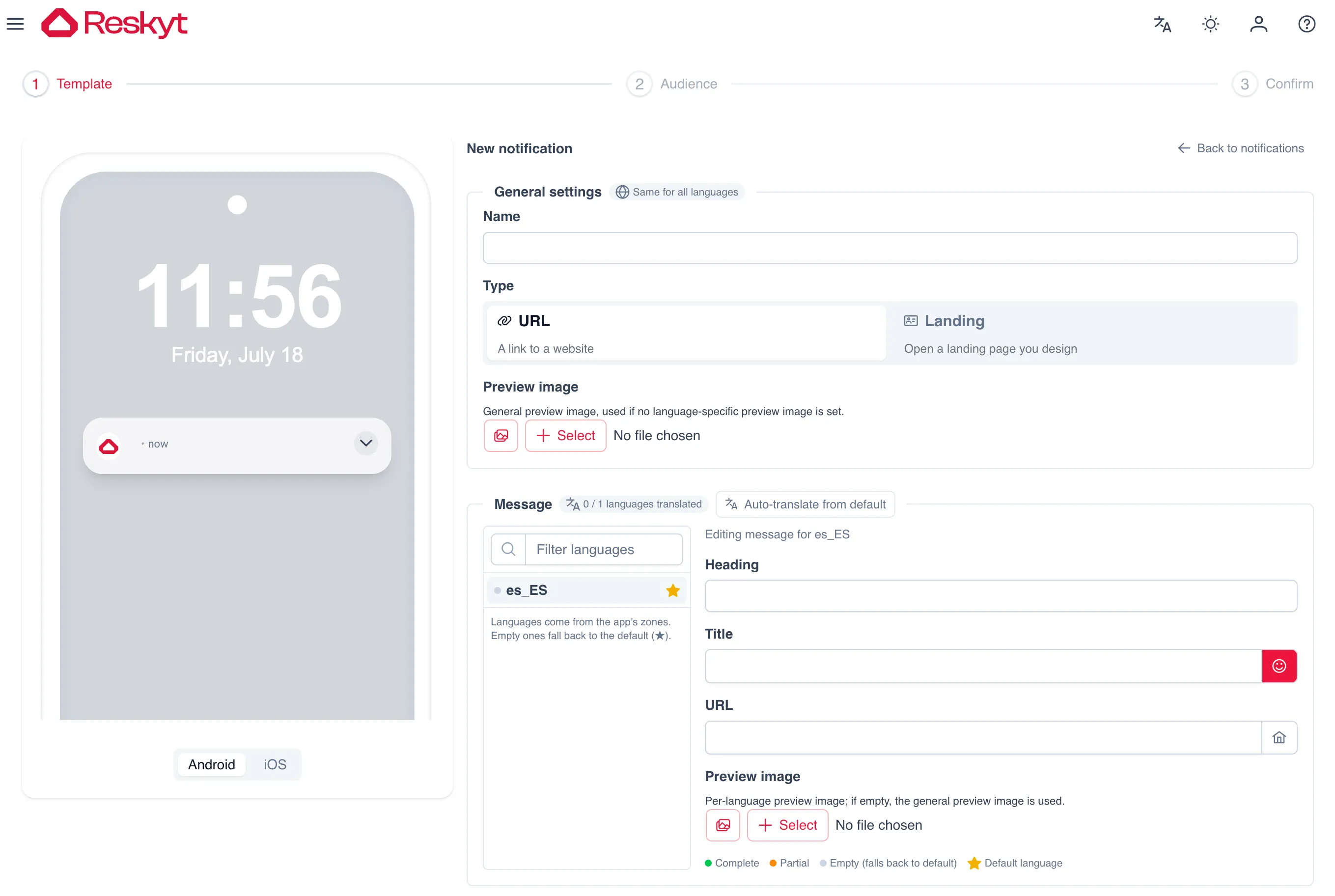
The first step defines the content. The general settings are common to all languages: the internal name of the campaign, the destination type and the preview image. The type can be a URL, which opens a web address, or a Landing, which opens a page you design yourself.
The message is edited per language. The available languages come from the zones configured in the app, and one of them is marked as the default language: the ones left empty fall back to it. For each language you fill in the heading, the title, the destination URL and, optionally, its own preview image that replaces the general one. There is also an automatic translation option based on the default language.
As you fill it in, the preview on the left shows how the notification will look, and you can switch between the Android and the iOS appearance.
It is the usual route for promotions, notices and communications that do not depend on an event in your systems.
Segmentation
Section titled “Segmentation”The audience of a send is built on the devices that have accepted notifications. You can send to the whole base or narrow it down by uploading a CSV with the list of devices you want to reach.
The usual pattern for being able to segment by customer is to store the device identifier in your CRM alongside the customer ID when the user logs in to the app. From there you build the segment with the data you already have and upload the resulting list, or trigger the send through the API.
To send from the API, the identifier sent in deviceId is the hashed
installation ID, which is obtained with
window.ReskytLayout.device.getHashedInstallationId(). The full flow is in the
push API reference.
Best practices
Section titled “Best practices”Notifications expire. If dateEnd is not specified, the API applies an expiry
of 7 days from the send. The utmCampaign field lets you tag the send with a
campaign identifier.
Send frequency affects the retention of the device base: a high volume of notifications can increase both permission opt-outs and app uninstalls.
If a notification does not arrive, the order of checks is in push troubleshooting.